Why We Chose WebSocket for Our Real-Time Voice Stack
01 — Problem Shape
What we're actually building
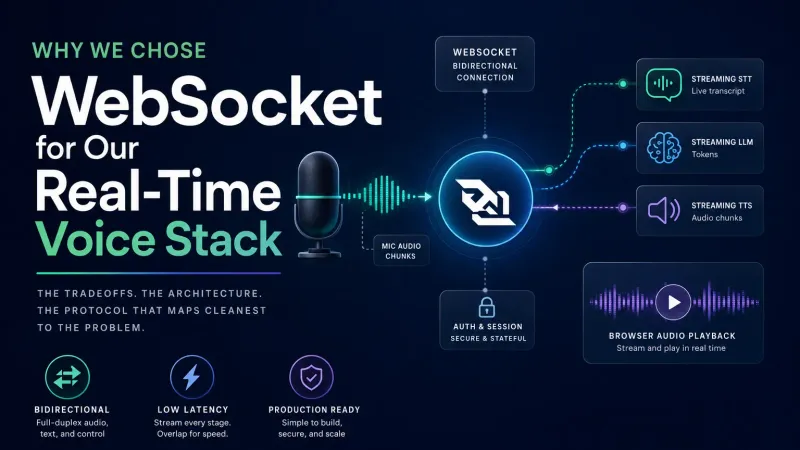
Before picking a transport protocol, it helps to be precise about the data flow. This is not browser-to-browser calling. There is no peer on the other side. The product shape is:
Browser microphone -> Your server -> AI services -> Browser audio playback
The key insight: this is a backend-mediated, bidirectional stream. The browser sends audio chunks up. The server sends transcripts, LLM tokens, and TTS audio chunks back. WebSocket maps directly to this shape.
WebRTC is designed for peer media. We don't have a browser peer or call room — we have a backend AI pipeline.
02 — Transport Comparison
Three protocols, one winner
We evaluated WebSocket, SSE, and WebRTC. Here's how they stack up for the specific job of "send mic audio to a server and stream AI output back."
| Transport | Direction | Binary audio upload | Server complexity | Verdict |
|---|---|---|---|---|
| WebSocket | Bidirectional | ✓ Native | Low–medium | Best default |
| SSE | Server → browser only | ✗ Needs separate POST | Low | Text streaming only |
| WebRTC media track | Bidirectional | ✓ As RTP | High | If already on WebRTC infra |
| WebRTC data channel | Bidirectional | ✓ | High | Valid but overkill |
| HTTP POST chunks | Request / response | ✓ | Low | Too much overhead per-chunk for live voice |
SSE is great for streaming LLM text tokens back to a browser — but it's one-directional. You'd need a second channel for audio upload, which defeats the simplicity. WebRTC adds signaling, ICE negotiation, and STUN/TURN overhead that only pays off when you need actual peer media or are already committed to a WebRTC backend like LiveKit or mediasoup.
Capability matrix
| Capability | WebSocket | SSE | WebRTC Data Channel | WebRTC Media Track |
|---|---|---|---|---|
| Browser sends mic chunks | Strong | Needs separate POST/fetch | Strong | Strong |
| Server sends transcripts/tokens | Strong | Strong | Strong | Needs data channel |
| Server sends TTS audio chunks | Strong | Possible but awkward | Strong | Strong if WebRTC peer |
| Barge-in / interrupt | Strong | Awkward | Strong | Strong |
| Auth with app session | Straightforward | Straightforward | More custom | More custom |
| Load balancing | Straightforward | Straightforward | Harder | Harder |
| Observability/debugging | Straightforward | Straightforward | Harder | Harder |
| STUN/TURN required | No | No | Sometimes | Often (depends on network topology and whether the server is publicly reachable or ICE-lite capable) |
03 — Audio Capture
Use browser media capture APIs regardless
Even though the transport is WebSocket, the browser-side capture story is unchanged. getUserMedia is part of the Media Capture and Streams API — shared with WebRTC, but not tied to it as a transport. Always use it with the full audio constraint set. You get browser-native echo cancellation, noise suppression, and auto gain control for free — before a single byte hits your backend.
Then use MediaRecorder or an AudioWorklet to emit small Opus-encoded chunks over your WebSocket connection.
Safari note:
audio/webm;codecs=opusis well-supported in Chrome and Firefox. Safari may requireaudio/mp4as a fallback — checkMediaRecorder.isTypeSupported()before committing to a codec.
Chunking recommendations
| Setting | Value |
|---|---|
| Chunk duration | 100–250ms |
| Codec | Prefer audio/webm;codecs=opus; detect fallback with MediaRecorder.isTypeSupported() |
| Silence handling | VAD before billing-heavy STT |
| Upload channel | WebSocket binary messages |
| Backpressure | Check ws.bufferedAmount |
| Turn-taking | VAD + server final transcript events |
04 — End-to-End Production Pipeline
The full flow from speech to response:
Sequence across services
05 — Latency
Overlap every stage
The fastest-feeling voice assistants don't wait for stage N to finish before starting stage N+1. They overlap. STT starts processing before the user finishes speaking. The LLM can start from stable partials or final utterance segments — kicking off before the full transcript is confirmed. TTS starts synthesizing before the LLM completes. Audio starts playing before TTS finishes.
                 0ms        500ms       1000ms      1500ms      2000ms
                 |           |           |           |           |
User speech      ████████████████████████░░░░░░░░░░░░░░░░░░░░░░░░
Capture + chunk  ████████████████████████████░░░░░░░░░░░░░░░░░░░░
Streaming STT    ░░██████████████████████████████░░░░░░░░░░░░░░░░
Streaming LLM    ░░░░░░░░░░░░░░░░░░██████████████████░░░░░░░░░░░░
Streaming TTS    ░░░░░░░░░░░░░░░░░░░░░░░░████████████████░░░░░░░░
Audio playback   ░░░░░░░░░░░░░░░░░░░░░░░░░░░░████████████████████
The anti-pattern to avoid:
record full audio -> transcribe full audio -> generate full answer -> synthesize full answer -> play audio
Each step may be individually fast, but the compounding wait time feels broken.
06 — Message Protocol
A typed WebSocket protocol
Use a single persistent WebSocket connection with typed message envelopes. This keeps your backend stateful per-session and makes barge-in handling straightforward.
Control and text frames are sent as JSON. Audio is sent as raw binary frames — don't try to embed binary data inside a JSON envelope. A practical split:
- JSON frames — all control messages (
session_start,audio_end,interrupt) and server-to-browser text events - Binary frames —
audio_chunk(mic data up) andtts_audio_chunk(TTS audio down); use a small binary header or a parallel JSON message to carry metadata if needed
| Direction | Type | Payload |
|---|---|---|
| Browser → Server | session_start |
locale, voice, auth/session metadata |
| Browser → Server | audio_chunk |
binary Opus chunk or JSON metadata + binary frame |
| Browser → Server | audio_end |
user stopped speaking or VAD turn ended |
| Browser → Server | interrupt |
user barged in while AI audio was playing |
| Server → Browser | transcript_partial |
partial STT text |
| Server → Browser | transcript_final |
final turn text |
| Server → Browser | llm_token |
response text token |
| Server → Browser | tts_audio_chunk |
binary audio output |
| Server → Browser | turn_end |
server completed the assistant turn |
| Server → Browser | error |
recoverable error information |
07 — When to Pick WebRTC
The WebRTC exceptions
There are legitimate reasons to choose WebRTC:
| Reason | Why it changes the decision |
|---|---|
| You are already using LiveKit, mediasoup, Janus, or Pion | The hard backend WebRTC work is already solved. |
| You need live calls, rooms, or peer media | WebRTC media tracks are the native model. |
| You need one unified session for audio/video/data | WebRTC can carry media and data together. |
| You need RTP-level media behavior | WebRTC gives jitter buffering, packet loss concealment, and media negotiation. |
If none of those are true, WebSocket is the simpler production path. For reference, here's what the WebRTC backend stack looks like:
08 — Final Decision
Decision tree
The stack
getUserMedia capture · WebSocket transport · Streaming STT · Streaming LLM · Streaming TTS · Browser audio queue · VAD turn-taking
| Area | Decision | Reason |
|---|---|---|
| Mic capture | Browser media capture APIs (getUserMedia) |
Browser-native echo cancellation, noise suppression, auto gain — independent of transport |
| Transport | WebSocket | Bidirectional, binary support, easy auth, simple scaling |
| Server pipeline | Streaming STT → LLM → TTS | Enables overlapped stages and low perceived latency |
| Audio playback | Streaming audio queue | Chunks play before full synthesis completes |
| Turn-taking | VAD + server final transcript events | Clean separation of detecting speech vs. confirming it |
Use WebSocket for real-time production transport, use
getUserMediafor browser mic quality, add VAD for turn-taking, and use streaming STT/LLM/TTS services for true real-time voice.